
Online Payments for Small Schools
Automated School Payment Software for Small Schools — One Portal, Payments Made Easy.
SchoolCues gives small schools a complete online payment system, with auto-pay, flexible tuition plans, ACH and card collection, real-time student balances, invoices, and receipts. All included, with no setup, training, or support fees.
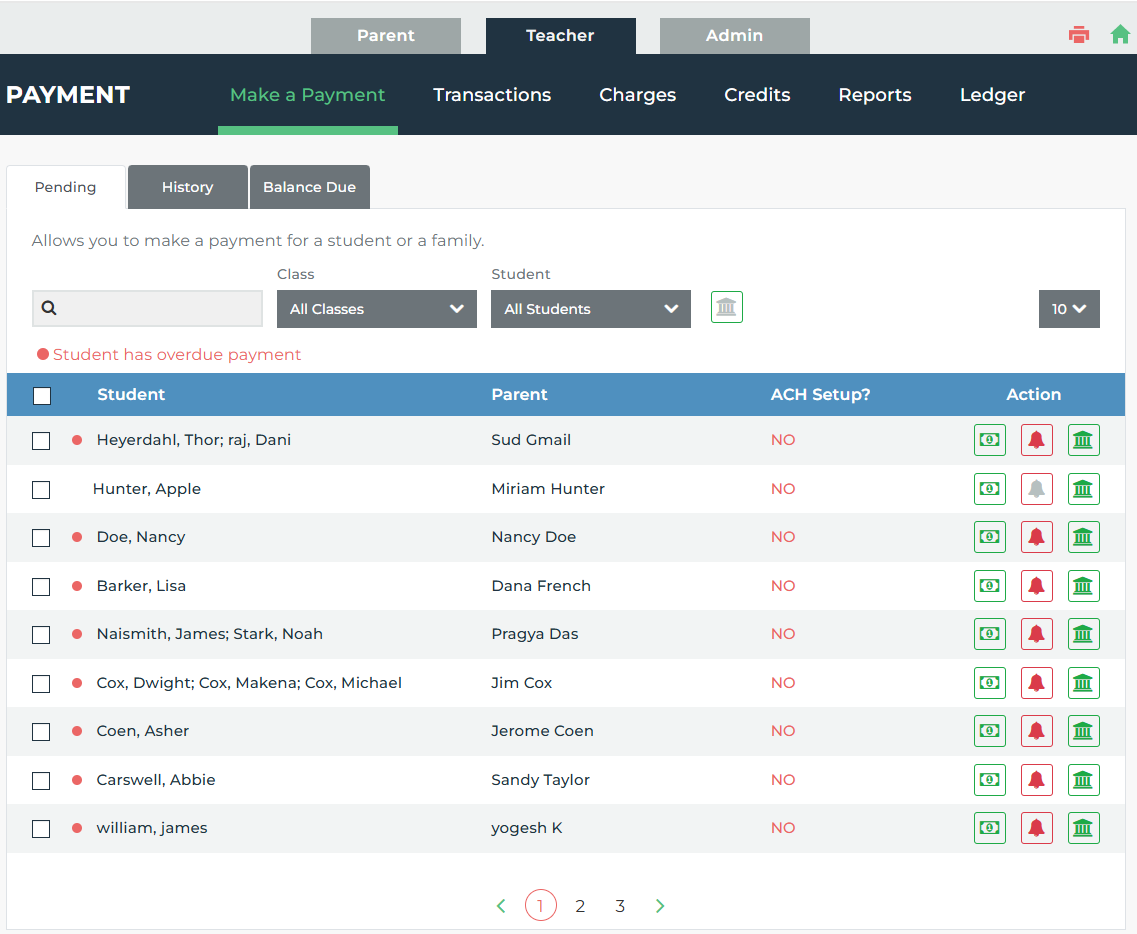
SchoolCues is an online school payment software for small private, Montessori, Catholic, Christian, Charter, Faith based, independent and Micro Schools. It collects tuition, enrolment fees, activity fees, field trip fees, lunch fees, and donations via ACH, credit card, cash, or check, with auto-pay, sibling discounts, flexible payment plans (full, semester, monthly, or custom), and tax statement generation, with no setup, training, or support fees.
See the full School Management Software for Small Schools platform this payment system is part of.
SchoolCues payment platform: by the numbers
The Numbers Behind How SchoolCues Runs Small-School Payments
Platform-wide aggregates across all SchoolCues schools, updated monthly.
$0
Payment module is FREE with the purchase of the Communications module, includes unlimited training and support
$35
The BeneFAQ application fee will be waived for all SchoolCues customers and the parents will only be charged $35.00 for each financial aid application.
4
Payment methods accepted: ACH bank transfer, credit card, cash, and check, all reconciled in one dashboard
24–48 hrs
Time to go live: set up, training and support included
Ready to automate school fee collection?
No setup fees. No training fees. No hidden charges.
Schedule a DemoWhat SchoolCues payment management software helps you manage
All your school payments managed online.
SchoolCues handles four categories of school payments: all configured from one admin dashboard and paid by parents from the web portal.
Tuition & Subscription Payments
Set up recurring tuition with custom frequencies: pay in full, by quarter, semester, trimester, monthly, or a completely custom schedule. Auto-pay enrolment keeps collections on track without manual reminders or follow ups. Runs on the SchoolCues Tuition Management System, so every plan updates automatically each cycle.
Auto-pay · Recurring billing · Custom frequency · Semester billing
One-Time Fees
Collect field trip fees, event fees, registration fees, and any other one-off charge on demand. Assign each one as mandatory, optional, or at-will so families know exactly what they owe versus what is voluntary. Fees collected here connect directly to your Admissions & Enrollment workflow.
Field trips · Events · Registration · At-will payments
Activity & Afterschool Fees
Manage afterschool programs, extracurricular activities, and lunch accounts with itemized fees separate from tuition. Parents see each charge clearly labelled. No confusion about what was paid or still due.
Afterschool programs · Lunch accounts · Extracurricular
Donations & Miscellaneous
Run school donation drives and collect miscellaneous fees through the same payment portal used for tuition payments. Every donation and payment is tracked, categorized, and available for reporting.
Donations · Miscellaneous fees · Shopping cart payments
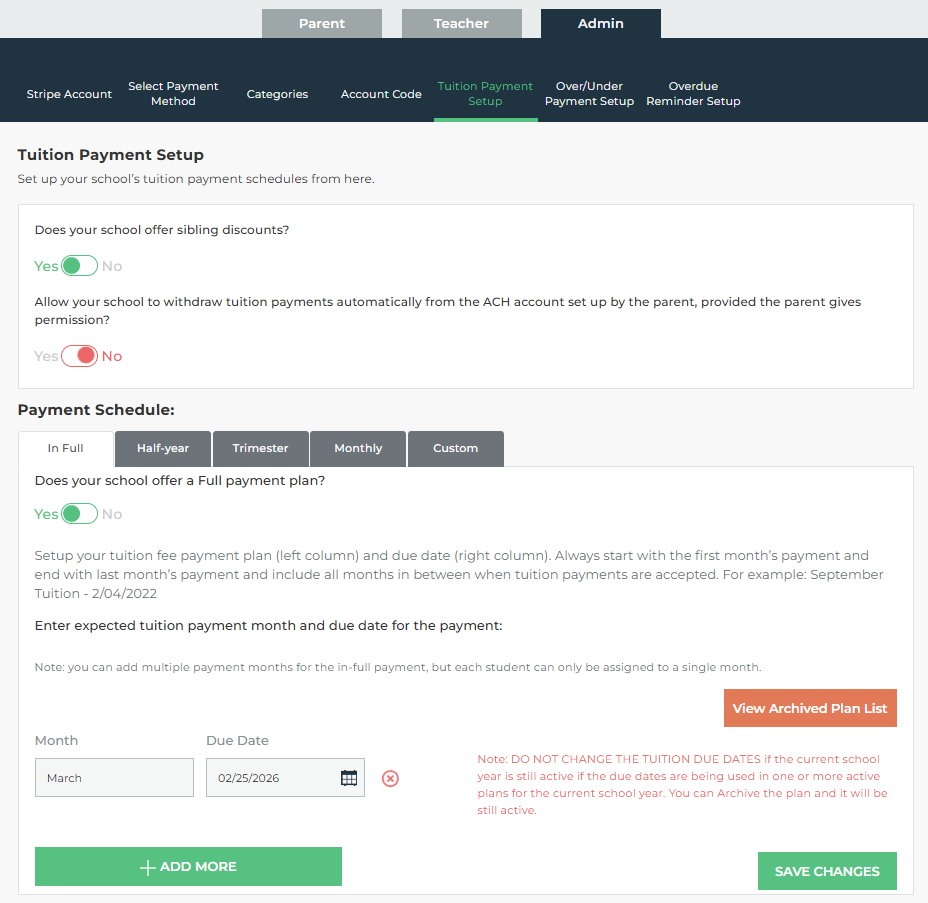
Easy setup, intuitive interface with powerful features
Your School's Complete Payment Workflow in Three Steps
SchoolCues online tuition management system is built to run with minimal admin effort: set it up once, and the system handles invoicing, collection, reminders, and bookkeeping reports automatically.
Step 1
Configure Your Payment Structure
Create your payment structure: tuition plans, fee categories, payment frequencies, sibling discounts, late-fee rules, and grace periods. Set each fee as mandatory, optional, or at-will. Assign account codes for bookkeeping. Done once. The system runs it every cycle. This is the same SchoolCues Tuition Management System used to configure fees across the platform.
Step 2
Parents Pay From Any Method
Parents log in to SchoolCues. They see every outstanding balance: tuition, activity fees, field trips, donations, itemized and due. They pay via ACH, credit card, cash, or check. Auto-pay handles recurring tuition and other recurring payments automatically.
Step 3
Reconcile With One Click
Every payment posts to the student account in real time. Pull payment reports filtered by student, class, payment type, or date range. Generate year-end tax statements for every family in seconds.
Get trained on our easy payment setup for your school in an hour or less. Onboarding included at no extra cost.
Schedule a DemoPayment management tools
Every Payment Capability Included: No Add-Ons, No Extra Fees
Every feature below is part of the SchoolCues Payments System from day one. No feature is gated. No per-family or per-transaction license applies. Because payment records are tied to live student profiles, this data stays in sync with the Student Information System automatically.
Flexible Tuition Plan Setup
Configure tuition with pay-in-full, semester, monthly, or custom frequency options: all from the same setup screen, accessible anytime from the web portal.
ACH, Credit Card, Cash & Check
Four payment methods in one system. ACH and card payments are processed online; cash and check are recorded by staff and post to the student account instantly.
Auto-Pay & Recurring Billing
Parents enroll in auto-pay for tuition and any subscription charge. The system collects on the scheduled date. No manual follow-up from your office.
Sibling & Family Discounts
Set up complex sibling discount structures, percentage or flat amount, per child or per family, and the system applies them automatically at billing.
Late Fees with Grace Periods
Configure late payment rules with or without a grace period. SchoolCues applies the late fee automatically on the defined date. No manual intervention required.
Electronic Invoicing
Deliver invoices digitally to parent accounts in the web portal. No paper, no postage, no manual distribution.
Over & Under Payment Handling
Accept partial payments and overpayments without system errors. Balances update correctly in the student account and are visible to both admin and parent.
Account Codes for Bookkeeping
Account codes to every payment category: tuition, donations, activity fees, and more.
Automatic Payment Reminders
SchoolCues sends automatic reminders before and after every due date via email, so your staff stops writing individual follow-up messages.
Refund & Adjustment Management
Process refunds and payment adjustments from the admin dashboard. Every adjustment is documented and reflected in the student's real-time account balance.
Payment Reports & Tax Statements
Generate customized payment reports and year-end tax statements for every family in one click, filterable by student, class, payment type, and date range.
Real-Time Student Account Balances
Every payment posts to the student account instantly. Parents see their live balance in the SchoolCues parent portal, eliminating balance-inquiry calls to your office.
Mandatory, Optional & At-Will Payments
Define each fee as mandatory (required), optional (offered), or at-will (pay anytime). Parents see the distinction clearly in their payment dashboard.
Back-End & Cash Payment Recording
Staff use the admin dashboard to enter cash and check payments received in person. The student account updates immediately, the same as any online payment.
Built for two audiences
A unified system, seamlessly integrated for administrators and parents.
SchoolCues online school payment software is built from two perspectives: the administrator who needs clean books and zero follow-up, and the parent who needs to pay any fee in under a minute from their phone.
For School Administrators & Bookkeepers
Complete Payment Control from One Dashboard
- ✓All fee categories in one view: tuition, enrollment, activity, field trip, lunch, and donations managed from a single admin dashboard, not across separate tools
- ✓Real-time student account reconciliation: every payment, refund, and adjustment posts instantly; no end-of-day batch processing or manual balancing
- ✓Automated late fees and reminders: set grace periods and late fee rules once; SchoolCues enforces them automatically on every account, every cycle
- ✓One-click tax statements: generate year-end tax statements for every family on demand; no manual compilation from multiple reports
For Parents
All Charges Payable From One Place
- ✓Pay from the SchoolCues parent web portal: no additional account required; the same portal parents use for School Newsletters, alerts, and announcements
- ✓Auto-pay enrolment for tuition: set it up once and recurring tuition is collected automatically on schedule; no monthly reminder needed from the school
- ✓Choose their own payment plan: pay in full, by semester, monthly, or on a custom schedule; each family sees only the options the school has configured for them
- ✓Live balance visible at any time: tuition, field trips, activities, and donations all visible with real-time balances; no need to call the school office
- ✓Automatic due-date notifications: email reminders go out ahead of every due date, so families never miss a payment
SchoolCues Payment Questions, Answered Specifically
Every answer below is specific to SchoolCues payment functionality, drawn directly from how the platform works for Montessori, Catholic, Christian, Independent, Charter, and Canadian schools today.
What payment methods does SchoolCues accept for school fees?
+How does SchoolCues handle tuition payment plans for families?
+Does SchoolCues integrate with QuickBooks for school bookkeeping?
+Can parents pay school fees from their phone using SchoolCues?
+What is BeneFAQ and how does it work with SchoolCues?
+How quickly can a small school start collecting payments through SchoolCues?
+Does SchoolCues reduce balance-inquiry calls to the school office?
+How does SchoolCues make tax season easier for school bookkeepers?
+How does SchoolCues compare with tracking tuition through spreadsheets or paper records?
+What is included when our school switches to SchoolCues from another payment system?
+What happens to our school's data if we decide to leave SchoolCues?
+Will a real person help our school set up payments?
+Start Collecting School Payments With SchoolCues
SchoolCues configures your complete payment system: tuition plans, fee categories, parent portal, and reporting tools, in less than a day. Unlimited training and support included.
Pair it with Gradebook for Small Schools to run grades and billing from one platform.
No setup fees · No training fees · No hidden charges · No support fees